sofatools / iosbridge
Your iOS app, on your iPhone, driven from Linux.
For developers who build iOS apps with xtool and have no Mac. iosbridge lets you, or an agent, look at the running app and operate it: screenshot, accessibility dump, tap by label, open a URL, scroll, type.
- Linux + iPhone
- Swift package + CLI
- Claude Code plugin
- MCP server (stdio)
iosbridge tap Increment{"id": "feea3b78971d", "ok": true, "message": "tapped: Increment"}iosbridge tap "Delete everything"{"id": "fa8c8462fc9f", "ok": false, "message": "guarded: \"Delete everything\" changes real data – tap again with --force (CLI) or force=true (MCP)"}The problem
xtool builds and installs. Then you are on your own.
xtool builds, signs and installs your app from Linux. But the moment you want to check what the app actually shows – or let Claude check it – the well-known tools for that expect a Mac: ios-simulator-mcp, XcodeBuildMCP, idb, Maestro and Appium all run on macOS. So you pick up the phone, tap around, and describe the screen back to your agent.
What iosbridge does
iosbridge puts a small Swift package into the debug build of your app. While the app is in the foreground it long-polls a relay on your Linux machine, runs the command it gets through UIKit accessibility, and posts the result back. A CLI and an MCP server talk to the same relay, so the loop “change code → build → install → look → tap → look again” works from your terminal or from inside Claude Code.
Demo
One session, from the relay to a guarded button
The CLI below is talking to the real relay. The app on the other end is a stand-in that answers like the HelloBridge example app, so you can see every output exactly as iosbridge prints it. Agents get the same answers through the MCP tools. Next to it, a real screenshot of the example app on an iPhone.
export IOSBRIDGE_TOKEN=$(openssl rand -hex 16)iosbridge relay &INFO relay listening on http://192.168.1.20:8765 (wlan0); also http://10.2.0.2:8765 (wg0)iosbridge status{"ok": true, "listening": true, "last_poll_s_ago": 1.1, "pending": 0}iosbridge dump | jq -c '.elements[] | {role, label, value}' | head -7{"role":"header","label":"HelloBridge","value":""}{"role":"text","label":"Count","value":"0"}{"role":"button","label":"Increment","value":""}{"role":"button","label":"Reset","value":""}{"role":"button","label":"Delete everything","value":""}{"role":"textfield","label":"Note","value":""}{"role":"header","label":"Rows","value":""}iosbridge tap Increment{"id": "feea3b78971d", "ok": true, "message": "tapped: Increment"}iosbridge open hellobridge://count/41{"id": "9a7e4dcfdcea", "ok": true, "message": "opened: hellobridge://count/41"}iosbridge type "buy oat milk"{"id": "365b7ab25961", "ok": true, "message": "typed: buy oat milk"}iosbridge tap "Delete everything"{"id": "fa8c8462fc9f", "ok": false, "message": "guarded: \"Delete everything\" changes real data – tap again with --force (CLI) or force=true (MCP)"}iosbridge dump | jq -c '.elements[1,5] | {label, value}'{"label":"Count","value":"41"}{"label":"Note","value":"buy oat milk"}iosbridge screenshot --out after.png{"ok": true, "path": "/home/you/HelloBridge/after.png", "width": 375, "height": 667, "scale": 1, "message": "375x667 pt at scale 1"}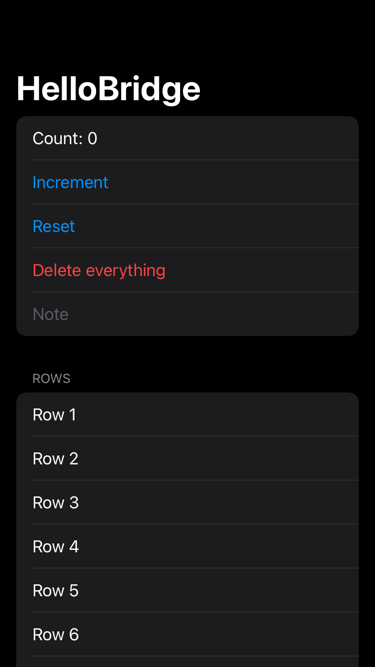
How it fits together
Your Linux machine
- Claude Code with the
ios-debugskill, or you in a terminal - iosbridge-mcp / iosbridge CLI
- relay :8765 · bearer token · in-memory queue
Your iPhone
- Your app, debug build
- IOSBridge
BridgeClient, polling while in the foreground - UIKit accessibility: screenshot, dump, tap, open, scroll, type
What’s included
- Swift package
IOSBridge(SwiftPM, iOS 16+): oneBridgeClientyou start in#if DEBUG - The relay: a single Python process, standard library only, in-memory queue, one bearer token, LAN only
- CLI
iosbridge:status,screenshot,dump,tapby label or x,y,open,scroll,type, plusbuildandinstallthrough xtool; JSON output and clear exit codes - Claude Code plugin: an MCP server with nine tools (
ios_status,ios_screenshot,ios_dump,ios_tap,ios_open,ios_scroll,ios_type,ios_build,ios_install) and the skillios-debugthat teaches the agent the loop - Guarded labels: buttons such as “Delete” are refused unless you pass
--force; the skill tells the agent to ask you first - HelloBridge, a complete xtool example app, and a README with a five-step setup and troubleshooting for the usual xtool, usbmuxd and iOS 17 stumbling blocks
What it does not do
- Apps you did not build: the bridge runs inside your own app only. No jailbreak, by design.
- The iOS Simulator, recording and replay of flows, several devices at once, video, Windows.
- App Store builds: the client turns on accessibility automation through a private API (the trick in-app test frameworks such as KIF use), so it belongs in
#if DEBUGonly. - Launching the app: xtool cannot launch apps on iOS 17+ from Linux. You tap the icon once; from then on the bridge takes over.
You need
Status
What has been tested
Current release: 0.1.2.
Tested on a real iPhone over Wi-Fi from Linux: screenshot, accessibility dump, tap, open URL, scroll, type, the guarded tap and the MCP server. The Python relay, CLI and MCP server and the Swift command logic are also covered by automated tests.
Alternatives
Compared with the usual iOS automation tools
If you have a Mac, use the tools below: they do far more than iosbridge – any app in the Simulator, recorded flows, CI integrations. iosbridge exists for the case they do not cover: no Mac at all.
| Tool | Needs macOS | What it drives | Agent integration |
|---|---|---|---|
| iosbridge | No | Your own app on a real iPhone (it embeds the package) | Claude Code plugin, MCP server |
| ios-simulator-mcp | Yes | Apps in the iOS Simulator | MCP server |
| XcodeBuildMCP | Yes (Xcode) | Xcode builds, the Simulator | MCP server |
| idb | Yes (companion runs on macOS) | Simulators and devices | CLI |
| Maestro | Yes, for iOS | UI flows in the Simulator | CLI, YAML flows |
| Appium (XCUITest) | Yes (Xcode, WebDriverAgent) | Simulators and devices | WebDriver API |
Based on each project’s documentation as of October 2026. Trademarks belong to their owners; no affiliation.
Price
Pay once. Keep the updates.
No subscription and no seats. You buy iosbridge once and keep read access to its repository, so every later version is a git pull away.
The license key Polar sends is your proof of purchase; iosbridge never checks it and never phones home.
- Read access to the private GitHub repository
- All future updates, via git pull
- A license key as proof of purchase
- Any number of your own devices
Checkout by Polar (Polar Software, Inc.) as Merchant of Record: Polar is the seller, issues the invoice and handles sales tax/VAT. You need a GitHub account. Terms
Questions
Do I need a Mac at any point?
Not for iosbridge. xtool builds, signs and installs from Linux (it needs an Apple ID, see its docs); iosbridge adds the seeing and the tapping. The relay, the CLI and the MCP server run on Linux.
Can it drive apps I did not write, or the Simulator?
No. The bridge is a Swift package inside your own app, and that is what keeps it simple and legitimate: no jailbreak, no access to other apps. There is no Simulator support; the Simulator needs macOS anyway.
Is it safe to leave in my app?
Keep it in debug builds only (#if DEBUG), as the README shows. It uses a private accessibility API and talks plain HTTP to the relay on your LAN, protected by a bearer token. Nothing leaves your network and nothing is stored.
Which agents can use it?
The plugin and the ios-debug skill are in Claude Code’s format. The MCP server is a standard stdio server (iosbridge-mcp), so other MCP clients that can start one can use the tools too. And everything works without an agent from the CLI.
Has it been run on a real iPhone?
See “Status” above; it says exactly what has and has not been tested for this release.
What exactly do I get when I buy?
One payment, no subscription. You get read access to the private GitHub repository sofatools/iosbridge – the full source, the documentation and every future update, which you fetch with git pull. Polar also issues a license key; it is your proof of purchase. iosbridge does not check it and never phones home.
How do I get access to the repository?
You need a GitHub account. After checkout, Polar asks you to connect it and then invites that account to the repository with read access. You install straight from the private repository (for example uv tool install git+https://github.com/sofatools/iosbridge) once git can use your GitHub login; the docs show how. There is no public package.
What does the license allow?
One purchaser, any number of your own devices and projects. Not allowed: redistributing, reselling or publishing the source. The software comes as is, without warranty. Full license text.
Who sells it, and what about invoices, VAT and refunds?
The checkout is run by Polar, which acts as Merchant of Record: Polar is the seller on your invoice, calculates and remits sales tax or VAT, and handles refunds under its buyer terms. See Terms.
Where do bug reports go?
To the issue tracker of the private repository you get access to. There is no support contract and no promised response time; this is a small product made by one person.